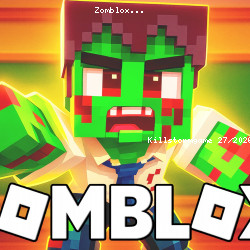
Zomblox – Browser Game Fun
mangomangomsk • 35.1K Plays • 280.4K Views • star 4.6 (2.6K)
All
Device
Landscape
Orientation
2.6K ratings
Rate This Game
gamepad How to Play Zomblox
Controls
- WASD = move
- Mouse = look around and shoot
- 1/2/3 = switch weapons
- 4 = throw grenade
- 5 = throw a cat
- E = pick up items
- R = reload
- Space = jump
Mobile
- Left joystick = move
- Swipe = look around
info About Zomblox
Zomblox recreates the charm of classic browser gaming for players who enjoy quick play games. From newcomers to experienced players, the difficulty progression adapts naturally to different skill levels. unity keeps gameplay responsive during online sessions.
If you prefer lighter best Shooting games, Pixel, 3D, Zombie, Gun, Survival, Block, FPS experiences, Zomblox can be an excellent match. Zomblox supports uninterrupted play directly in your browser. Keep exploring additional games like Sandbox City and Samurai's Shadow.
Zomblox is a pixel-packed FPS where meme madness meets zombie survival in a school under siege. Battle through classrooms, pools, and secret vents as you face off against undead classmates—and the zombified teacher herself. Complete missions, uncover hidden secrets, grab wild weapon skins, and rescue your friends in this chaotic, meme-fueled shooter.
Technology
help Frequently Asked Questions
How do I play Zomblox? expand_more
What are the objectives in Zomblox? expand_more
Are there any useful tips for playing Zomblox? expand_more
Is Zomblox difficult to progress in? expand_more
What are the controls for Zomblox? expand_more
Related Games
Stickman Parkour Master
Kogama 4 Players Parkour
Impossible Mega Ramp Car Stunt
GEOsplash
Hyper Evolution
Hazmob FPS: Online Shooter
Stabfish 2
Car Tuning Simulator
Crazy Plane Landing
Kogama: World Racing
Ball Blaster
Toss the Turtle
Summer Vacation

Oil Digging
Bed Wars