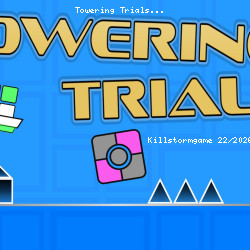
Play Towering Trials High Score
Tynamite Games • 66K Plays • 658.1K Views • star 4.4 (6.8K)
All
Device
Landscape
Orientation
6.8K ratings
Rate This Game
gamepad How to Play Towering Trials
Controls
Game Controls
- W / up arrow key = jump or fly
- A / left arrow key = move left
- D / right arrow key = move right
- P / Tab = pause
Editor Controls
Click on the type of tile you want to lay on the screen to start editing. You can choose what kind of tile you want to lay using the group buttons (block, spike, etc.) to the left of the block buttons.
If a laid tile has a green outline, it has been selected.
Mouse
- If hand button on & building = lay multiple tiles with a mouse drag
- If hand button on & editing = select multiple tiles with a mouse drag
- If hand button off & building = scroll upward with a vertical mouse drag / lay a single tile
- If hand button off & editing = scroll upward with a vertical mouse drag / select a single tile with a mouse click
- Mouse-scroll = Move the camera view up and down
Keyboard
- WASD = move selected tiles
- Shift + WASD = move selected tiles 1/16 of a grid block
- Alt + WASD = Move selected tiles 1/2 of a grid block
- QE = rotate selected blocks
- Ctrl + S = save the editor level
info About Towering Trials
From gameplay quality to quick accessibility, Towering Trials meets the expectations of fans very well. The pacing and structural flow of Towering Trials are largely guided by Action, Mobile, Avoid, Jumping, Difficult, Platform, 2D, Obstacle, Skill conventions.
Gameplay remains stable throughout sessions on multiple devices. Towering Trials offers endless entertainment with no downloads required.
Towering Trials is an engaging vertical-scrolling platformer that challenges players to jump, dash, and fly to the finish line across various levels. This game blends creativity with skill, making it a perfect pick for platformer enthusiasts who enjoy challenging gameplay and the freedom to create and share custom content.
Features
- Flexible Level Selection: Players can choose from several prebuilt levels in any order. The level selection screen provides a visual difficulty guide using animated faces: the more anxious the face, the more complex the level.
- Creative Level Editor: Design and build custom levels to share with friends, allowing endless replayability and personalized challenges.
- Dynamic Movement Mechanics: Master jumping, dashing, and flying mechanics to navigate challenging vertical layouts.
- Skill-Based Gameplay: The game's difficulty increases with more intricate platforming challenges and obstacles, making it a true test of precision and timing.
Discover Towering Trials and jump into the fun instantly For a gameplay experience like Towering Trials, try Stickman Destruction 3 Heroes and Rolling Balls Sea Race.
Technology
help Frequently Asked Questions
How do I play Towering Trials? expand_more
What are the controls in Towering Trials? expand_more
Are there any tips for succeeding in Towering Trials? expand_more
What is the difficulty level of Towering Trials? expand_more
What are the objectives in Towering Trials? expand_more
Related Games

Lulu's Fashion World
Squish
Stickman Parkour Master

Ellie's Recipe: Dubai Chocolate Bar
Kogama 4 Players Parkour

GEOsplash

Drift Boss
Idle Train Empire Tycoon

Words of Wonders
Go Escape
Stickman Clash

Ball Blaster

Toss the Turtle
Epic Empire: Tower Defense

Summer Vacation