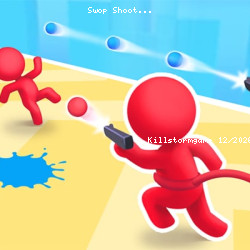
Play Swop Shoot Skill Game
Beetleplay • 135.7K Plays • 407.1K Views • star 4.4 (9.9K)
All
Device
Both
Orientation
9.9K ratings
Rate This Game
gamepad How to Play Swop Shoot
Controls
Drag the left mouse button to move the stickmen to the left and right.
info About Swop Shoot
Swop Shoot brings more variety and freshness to the category. Swop Shoot expresses creativity within the Action, Avoid, 3D, Running, Color, Mouse, Stickman genre through varied and entertaining challenges.
Players keep coming back thanks to its highly replayable design and well-balanced core mechanics. Players can safely access the full experience anytime via Kill Storm Game. Play Swop Shoot anywhere with only a browser connection.
Swop Shoot is a shooting game where you control these 2 stickmen as a single unit. The blue stickman can only kill the blue enemies, and the red stickman can only kill the red enemies. Once you reach the end of the stage, you will merge and become the purple stickman to kill the boss.
Release Date
August 2022
Developer
Swop Shoot was developed by Beetleplay.Platforms
- Web browser (desktop and mobile)
- Android
Technology
help Frequently Asked Questions
How do I control the stickmen in Swop Shoot? expand_more
What are the winning conditions in Swop Shoot? expand_more
Are there any useful tips for playing Swop Shoot? expand_more
Is Swop Shoot difficult to play? expand_more
How do I progress in Swop Shoot? expand_more
Related Games

Hidden Object: Clues and Mysteries

Lulu's Fashion World
Squish
Stickman Parkour Master

Ellie's Recipe: Dubai Chocolate Bar

Impossible Mega Ramp Car Stunt
Computer Office Escape
GEOsplash
Drift Boss

Hyper Evolution

Idle Train Empire Tycoon

Bubble Shooter
Words of Wonders
Car Tuning Simulator

Crazy Plane Landing