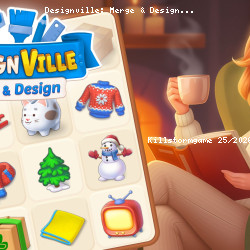
Discover Designville: Merge & Design Game
TAPCLAP • 147.4K Plays • 147.4K Views • star 4.5 (6.2K)
All
Device
Landscape
Orientation
6.2K ratings
Rate This Game
gamepad How to Play Designville: Merge & Design
Controls
Use the left mouse button to play the game.
info About Designville: Merge & Design
Find out why this browser game continues to draw player attention. Among unblocked Puzzle games, Mobile, Premium Perks, Relaxing, Story, Can’t Stop Playing, Merge games, Designville: Merge & Design balances convenience and entertainment in a smooth experience. Players who enjoy unblocked games for school will quickly find themselves drawn to Designville: Merge & Design.
Consistent performance across devices is achieved using iframe. Designville: Merge & Design focuses on fast, simple gameplay that remains genuinely enjoyable.
Designville: Merge & Design is a casual game that takes you on a creative adventure to renovate and decorate various spaces. Tackle unique design challenges, craft stunning interiors, and turn your studio into the best in town. Unleash your creativity to bring your dream designs to life and grow your decorating empire!
How to Play Designville: Merge & Design
The objective of the game is to renovate the run-down home. Louise and Robin are renovating an abandoned house to transform it into a Design Studio, the best of Designville! After a brief intro of characters, you will be introduced to a board with multiple items. Most of which are cardboard boxes from the renovation. You'll open the boxes of stuff that Robin acquired for the renovation, and the items will be placed on the board.
Renovations are accomplished by merging items, designing, and decorating gardens. The grid is primarily filled with boxes, but other tiles are filled with random objects commonly found in a home, including coffee cups, pizza slices, rubber gloves, and more. Most of these items are covered in dust and cobwebs, and some can only be accessed on other levels.
Merging items and discovering new ones will earn you money that can be used to enable the renovation, clearing tasks from a to-do list which will eventually lead you to the renovated Design Studio. Once the Studio is up and running, Louise and Robin will start taking orders from clients, initially friends and acquaintances, and later referrals, and they will allow the Studio to expand its reputation and complete more complex tasks.
There is one object on the grid that is most important to begin merging: a yellow bag full of corkboard push pins. Left-click on the yellow bag to fill all empty board pieces with push pins. This is where you merge. Begin merging all push pins. It takes two push pins to create another object, an eraser. As you merge, you will get more free board space, so keep clicking and merging.
Potential merges and results:
- 2 corkboard push pins = 1 eraser
- 2 erasers = 1 Post-it note
- 2 post its = 1 ruler
- 2 rulers = 1 round ruler
- 2 protractors = 1 pencil
- 2 pencils = 1 highlighter
- 2 highlighters = 1 drawing compass
- 2 drawing compasses = 1 stapler
- 2 staplers = 1 color sample
Keep merging and find more and more new items.
More Games Like This
If you're a fan of merge games, Little Alchemy is a fantastic choice, where you get to merge Earth’s four basic elements to form new discoveries.
Browse our casual games category for more popular titles like Geometry Dash, which offers a fun experience of moving following the music, or Idle Breakout, where you'll observe how your balls clear the stage.
Release Date
December 2021 (Android, iOS and HTML5)
Platforms
- Web browser (desktop and mobile)
- Android
- iOS
Technology
play_circle Designville: Merge & Design - Gameplay
help Frequently Asked Questions
How do I play Designville: Merge & Design? expand_more
What are the winning conditions in Designville: Merge & Design? expand_more
Are there any tips for progressing in Designville: Merge & Design? expand_more
Is Designville: Merge & Design a challenging game? expand_more
What are some useful strategies for Designville: Merge & Design? expand_more
Related Games

Hidden Object: Clues and Mysteries

Ellie's Recipe: Dubai Chocolate Bar
Drift Boss
Idle Train Empire Tycoon
Words of Wonders
Go Escape
Stickman Clash
Ball Blaster
Epic Empire: Tower Defense

Summer Vacation
My Monster Pet: Train & Fight

StarBlast

Oil Digging
Bed Wars
Domino Battle