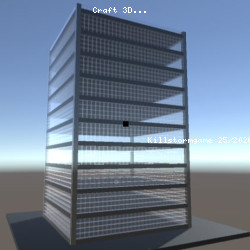
Craft 3D – Exciting Adventure Adventure
Benjamin Man • 122.5K Plays • 612.1K Views • star 4.6 (4.9K)
All
Device
Landscape
Orientation
4.9K ratings
Rate This Game
gamepad How to Play Craft 3D
Controls
- WASD or Arrows Keys: move
- R: move up
- F: move down
- Mouse: look
- Left click: create blocks
- Right click: destroy blocks
- In floor duplicator, press P to duplicate
- X: return home
Block Color Selection
- 0: Grey
- 1: Black
- 2: White
- 3: Red
- 4: Green
- 5: Blue
- 6: Yellow
info About Craft 3D
Craft 3D delivers a smooth and convenient online gaming experience directly on Kill Storm Game. Craft 3D demonstrates the diversity found within gameplay. The Adventure, Sandbox, Minecraft, 3D, Building, Block elements encourage strategy, precision, and thoughtful play.
Craft 3D is a Minecraft-inspired sandbox game in which you can explore and build different 3D worlds. Use the building generator to make large buildings and skyscrapers in a matter of seconds. Make a tall and unique building with the floor duplicator by only building the first floor and duplicating it. You can also use the terrain generator to play around with pre-made objects.Release Date
July 2020Developer
Craft 3D was developed by Benjamin Man.Platform
Web browserTechnology
help Frequently Asked Questions
How do I build large buildings quickly in Craft 3D? expand_more
What is the floor duplicator feature in Craft 3D? expand_more
What can I do with the terrain generator in Craft 3D? expand_more
Are there any tips for progressing in Craft 3D? expand_more
How do I control my character in Craft 3D? expand_more
Related Games
Kogama 4 Players Parkour
Impossible Mega Ramp Car Stunt
Computer Office Escape
Hyper Evolution
Car Tuning Simulator
Crazy Plane Landing
Kogama: World Racing
Ball Blaster

Summer Vacation

Oil Digging
Bed Wars
Kogama: Hallow Special - trick or treat
3D Flight Simulator
Merge Battle Tactics
Monster Life